Your screen should wind down when you do.
Night Shift flips a switch. f.lux warms the color and stops there. The Daily Dimmer is different: anchor it to your bedtime and it tapers brightness and warmth continuously toward it, the way an actual sunset works, then brings the morning back gently. No tool in this category, out of the 32 we studied, ships a bedtime-anchored brightness-and-warmth curve.
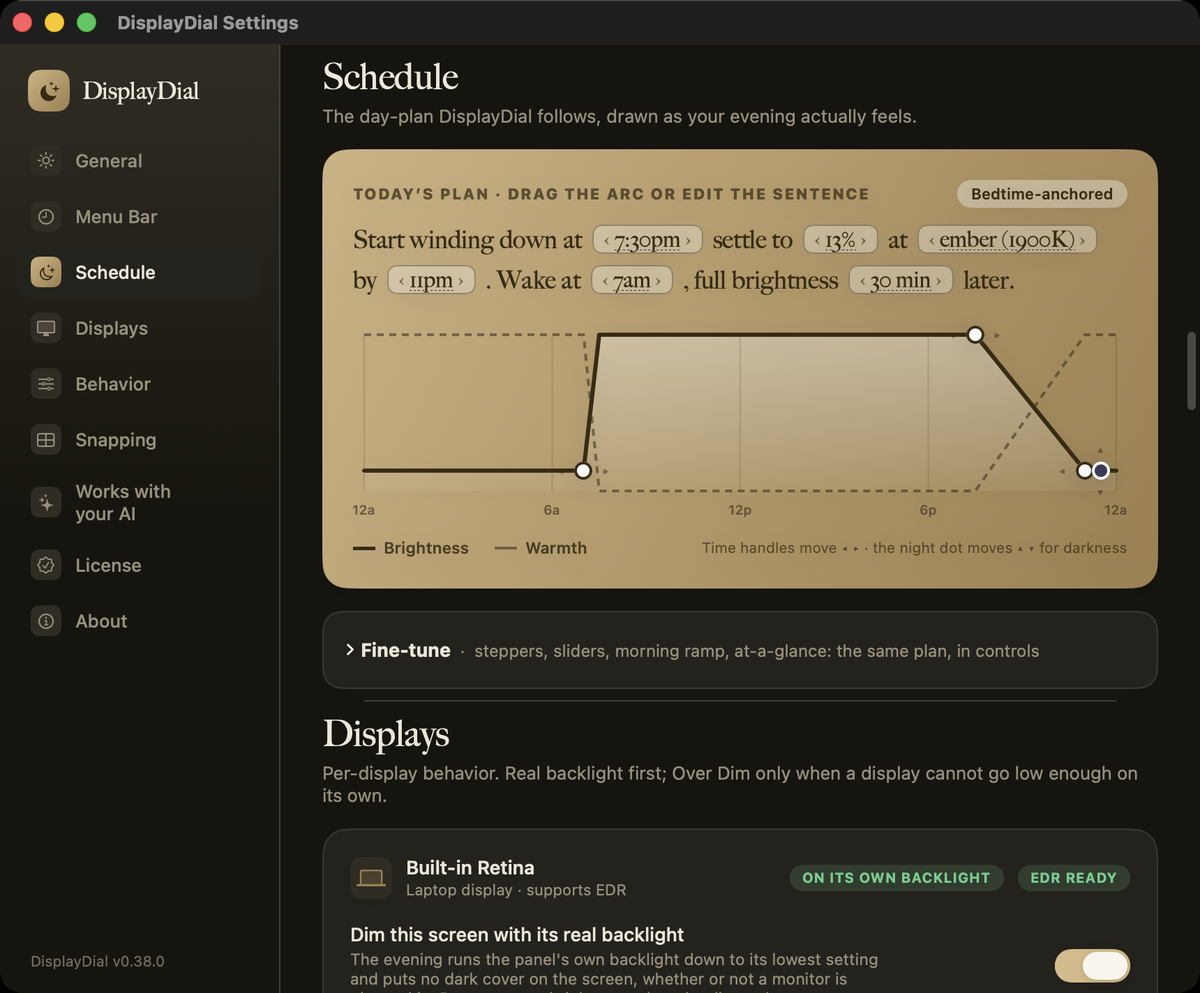
A melatonin-aware descent: the wind-down starts about three and a half hours before your bedtime, settles at your chosen darkest point and warmth by bedtime, and brightens over 30 minutes after you wake. Every number is yours to tune.
The same curve, as a color rather than a number: one evening from 7:30pm to bedtime, played once. Every shade is computed from the brightness and Kelvin the app would actually be holding at that minute, so what you see here is the arithmetic, not an impression of it.
- Anchored to your bedtime, not to sunset in your timezone. Set 11:00pm and the ember glow arrives exactly then.
- Brightness and warmth together. The curve carries both, down to a 1,900K candle-warm at your darkest point.
- Respects you. Adjust anything by hand and the schedule pauses, then resumes on its own. Pause it for 10 minutes or the whole night in one tap.
- Morning ramp. A gentle 30-minute brighten after wake, so the first email of the day is not a floodlight.
Working in the sun? One click and your screen holds up.
Sun Mode sets your MacBook's built-in display to full brightness, adds the extra brightness boost on screens that have it, turns on Increase Contrast and Reduce Transparency for stronger contrast and solid menus, and pauses the evening dimming. Pick 30 minutes, 1 hour, 2 hours or 4 hours. When the time is up, Sun Mode turns itself off and restores every setting exactly as you had it.
- You can see it is on. An amber sun with a countdown replaces the usual menu bar icon.
- It ends on its own. There is no setting to remember to undo. Need more time? Add 30 minutes from the same card.
- Your settings come back exactly. Brightness, contrast and transparency are recorded before anything changes, and restored when the timer ends, when you turn Sun Mode off, when you quit, or after a crash or restart.
- Open it from Jump Valet or a link. Type sun mode in Jump Valet, or use a displaydial:// link from a script or another app.
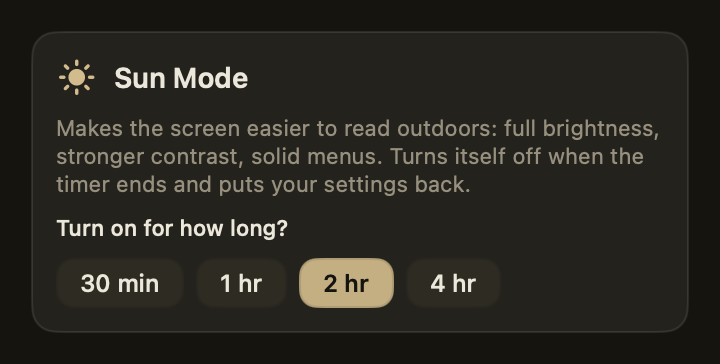
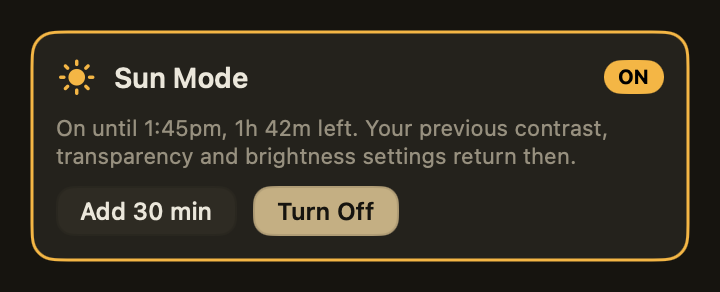
 The menu bar while Sun Mode is on.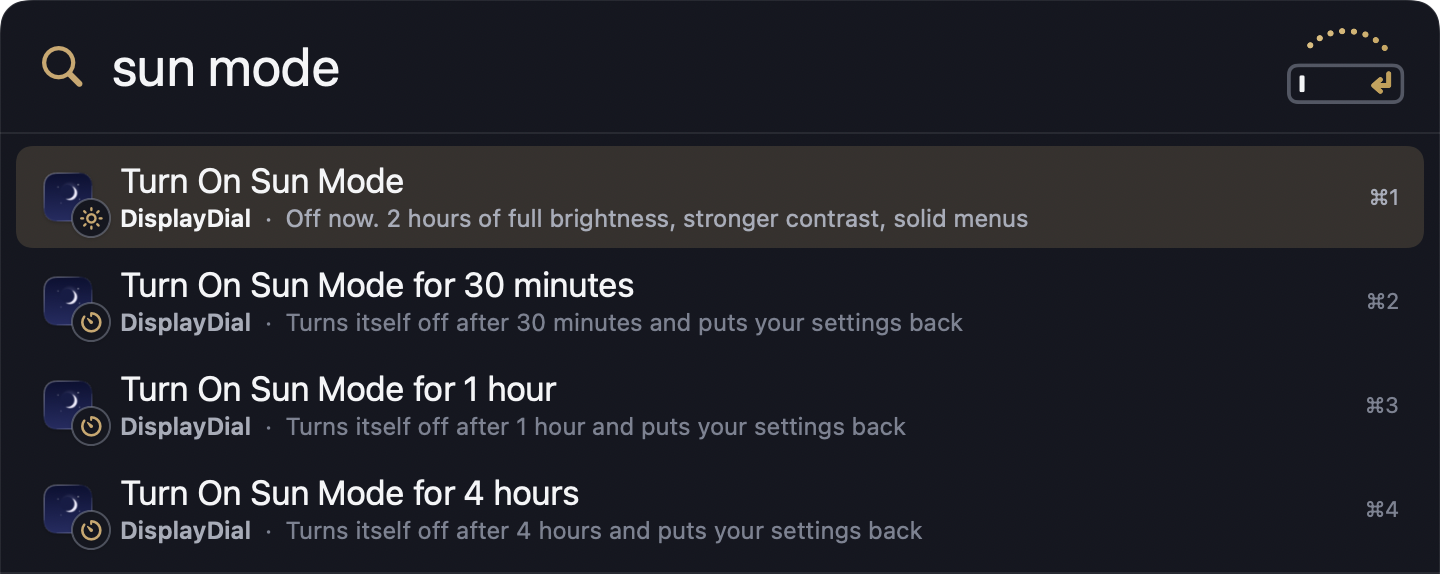
"My external monitor ignores my Mac's brightness keys entirely."
Plug in a second screen and F1/F2 stop working the moment they leave the built-in panel. The monitor sits blindingly bright at night or too dim during the day. So you stack MonitorControl for the hardware, f.lux for the warmth, and an overlay dimmer for a dark room, and the pieces fight each other for the same color table, forget their state after sleep, and break at every dock swap.
"How come I get no eye fatigue whatsoever from my MacBook, iPad, iPhone but whatever monitor I buy kills my eyes?"
Apple Support Communities · real thread"External display always increases brightness after sleep even with 'apply last saved settings' enabled."
MonitorControl on GitHub · issues #850, #843"F.lux resets the color table every few seconds," breaking other display apps trying to coexist with it.
BetterDisplay on GitHub · discussion #2508These are real, sourced voices describing the category's pain, quoted from public issue trackers and support threads.
Real hardware brightness on every display, in one panel
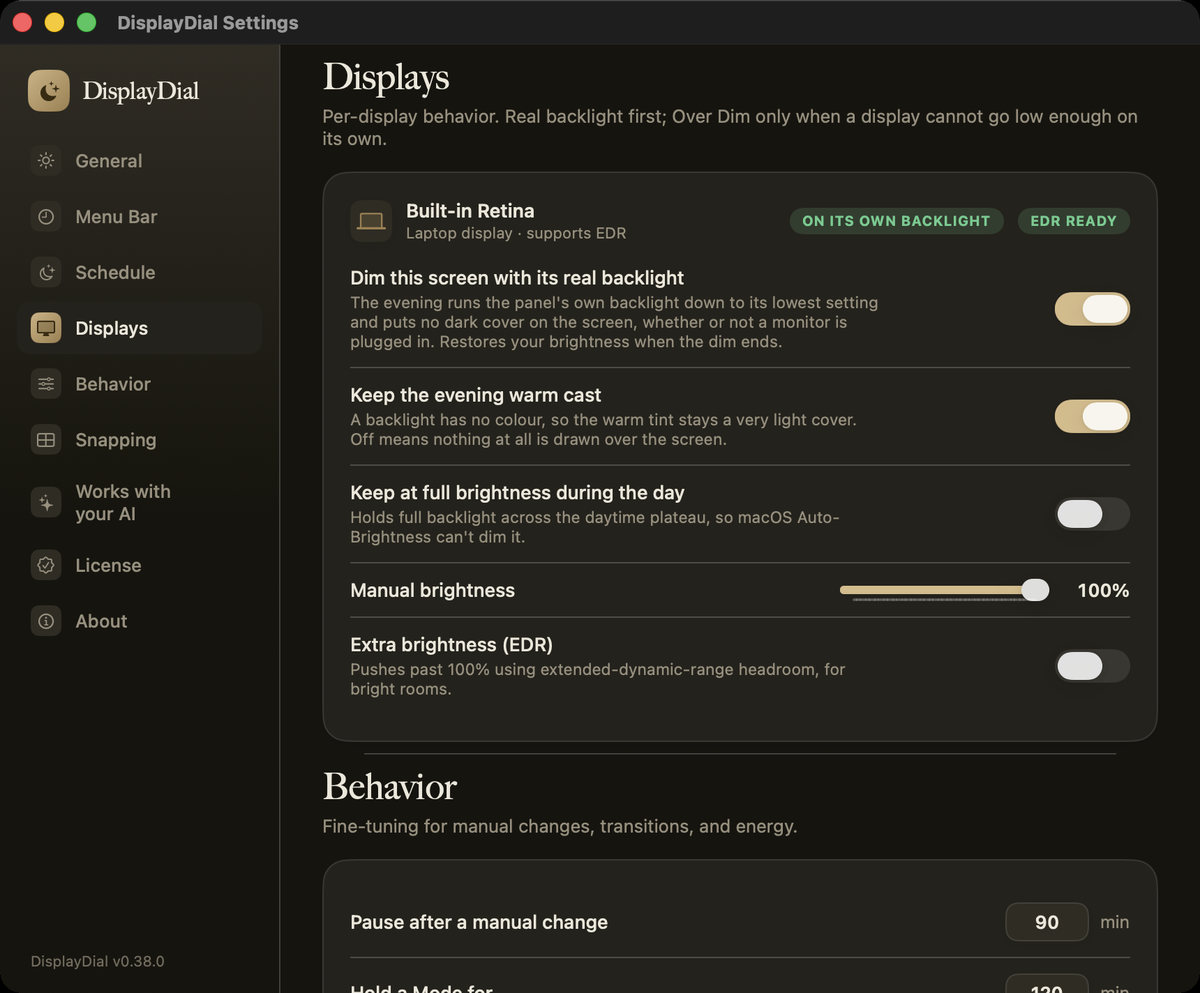
Not a gamma trick pretending to be brightness. DisplayDial drives the actual backlight of your built-in display and the actual luminance of every external monitor that speaks the Display Data Channel (DDC) protocol, over USB-C, HDMI, or DisplayPort, each with its own independent slider.
- A hardware valve per display. Built-in Retina and external monitors get independent, real brightness sliders, so the Dell's on-screen-display (OSD) buttons can finally retire.
- A click-through dimmer cover on top. When the hardware floor is still too bright for a dark room, a translucent overlay dims further, and your cursor and clicks pass straight through it. Electron apps included.
- Invisible to screenshots. The dimmer never lands in a macOS screenshot or screen recording: captures come out at full daytime brightness while your eyes keep the dim. An 11pm screenshot looks like noon, with nothing to pause and nothing to redo.
- Warmth on the same dial. A neutral or warm tint rides the same control, so "darker" and "gentler" are one motion, not two apps.
- A reconnect safety net. A newly-connected monitor stuck dark from a previous session gets raised back to normal automatically. It only ever raises, never lowers.
- Scriptable. The dim command-line tool (CLI) ships with the app: status, set, presets, schedule. Everything the panel does, your scripts can do.
Anti-lockout floor
A hard 5% limit is engineered into every dimming path, overlay and hardware alike. Every competitor category has documented black-screen complaints; DisplayDial engineers "accidentally unusable" out of every dimming path.
Idle energy saver
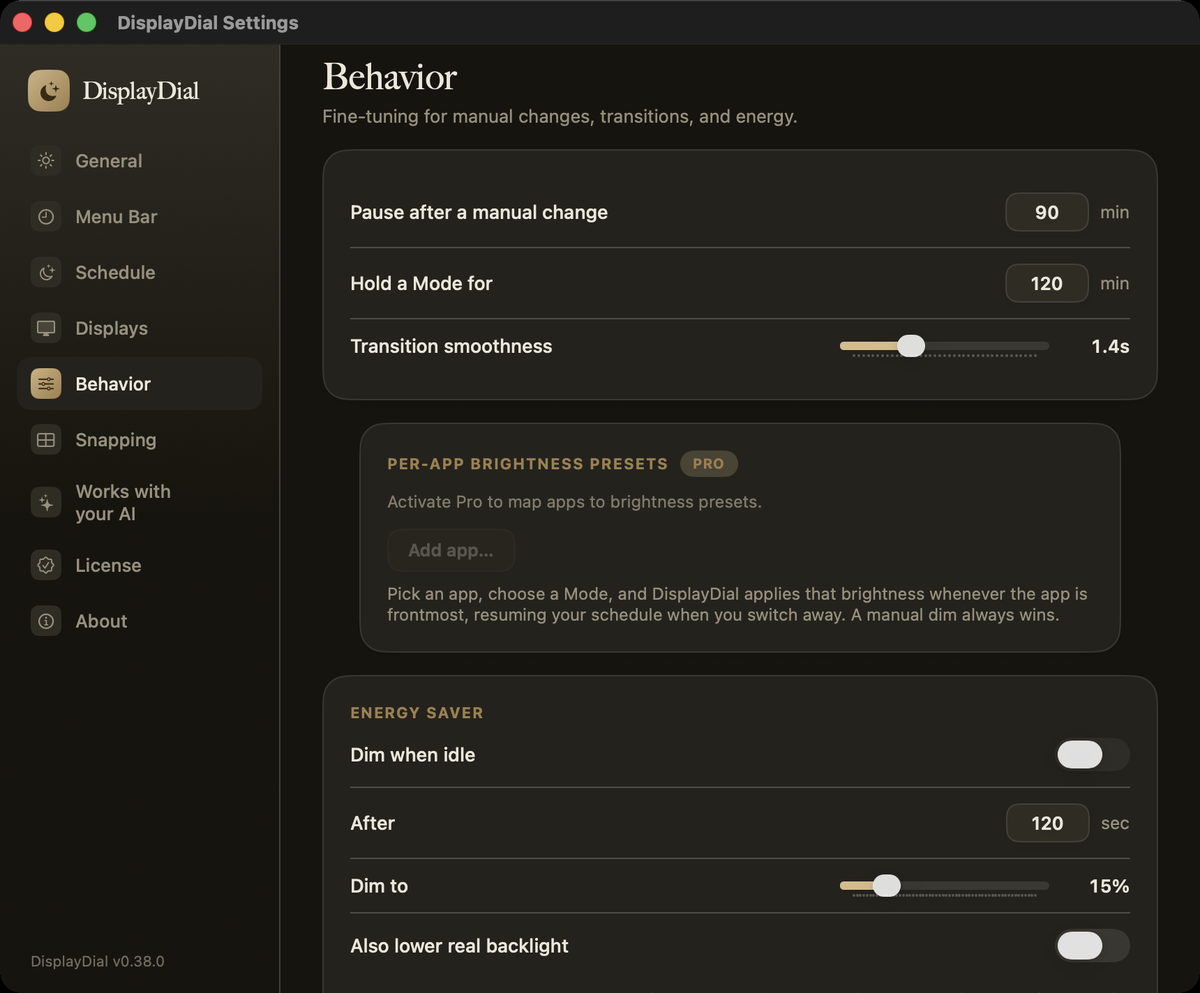
Step away and the screen eases down to save power; touch anything and it snaps back instantly. Same anti-lockout floor, so idle never means invisible.
Modes
Day, Evening, Reading, Movie, Focus, Night, Away. One tap applies brightness and warmth together, holds for a while, then hands control back to the schedule.
What the app does today.
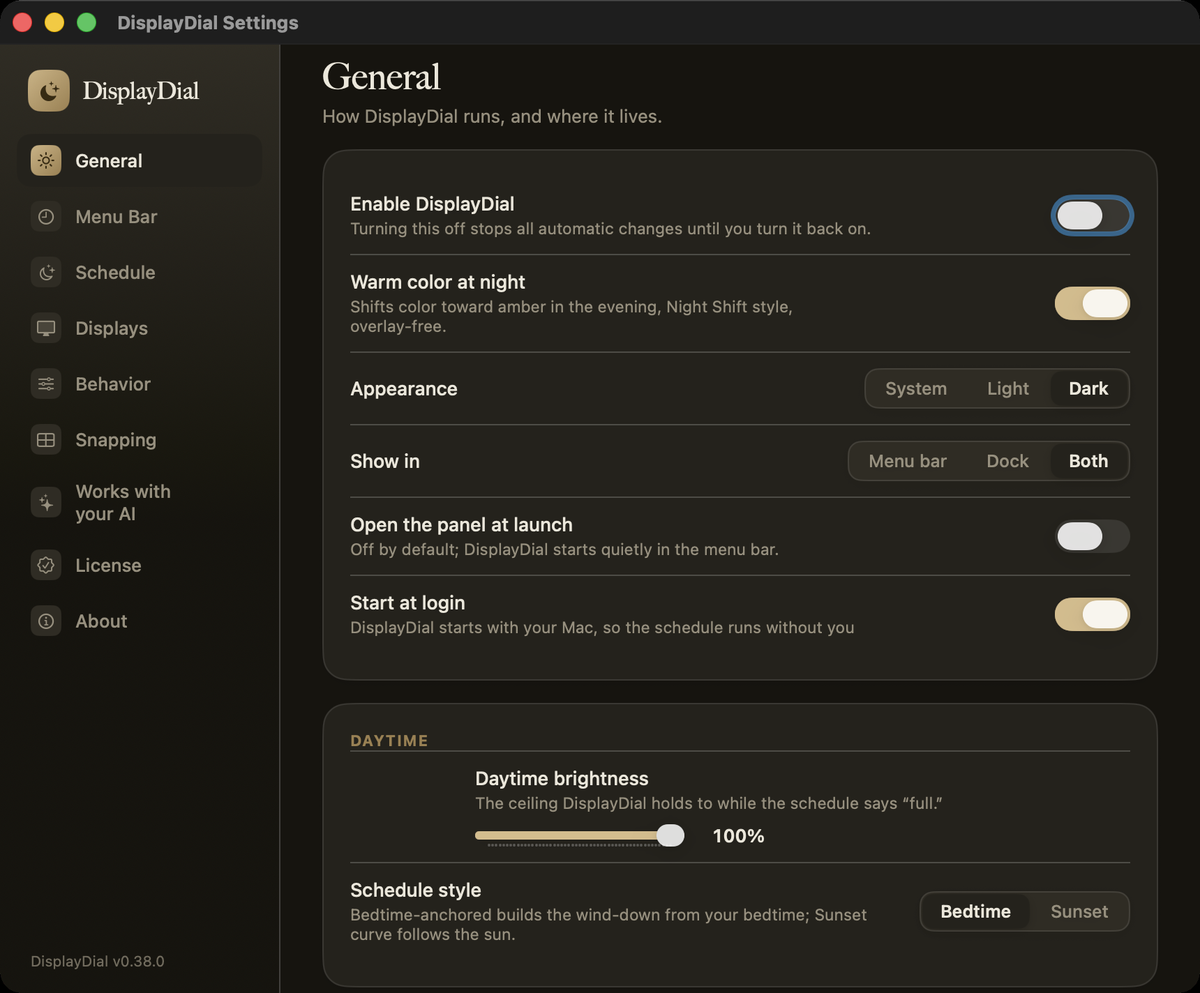
Every capability below is running in the shipping app, and these are captures of it.
Per-app brightness presets
Pin a brightness and warmth level to a named app. Switch into it and the dial follows on its own, then hands control back the moment you switch away.
XDR/EDR brightness boost (Apple's extended-dynamic-range headroom)
Push a supported built-in display past its standard cap for a bright room, the mechanic BrightIntosh and Vivid pioneered, folded into the same dial instead of a separate app.
Per-display memory and the command line
Dock at your desk and every monitor returns to its saved brightness. Undock and the laptop takes over. If a display's level was never saved, it comes back at full rather than staying dark. Script any of it from a terminal with the dim CLI.
Live in the app today
- Hardware brightness valve for every display, built-in and DDC-capable external
- Click-through sub-floor dimming overlay, invisible to screenshots and recordings
- Daily Dimmer bedtime curve, brightness and warmth together
- Anti-lockout 5% floor on every dimming path, plus the reconnect safety net
- Per-display state persistence across sleep, dock, and undock
- Idle power-save dimming with the same floor
- Per-app brightness presets and the XDR/EDR boost
- The dim command-line tool
Notarized, licensed, and yours to keep
A notarized download and a license that lives on your own Mac. Nothing to sign up for, no subscription. Join the waitlist and you get the build and the waitlist price.
Tell Claude how your evenings should look.
DisplayDial ships a local Model Context Protocol (MCP) server, bundled inside the app, so Claude on your Mac can read the dimmer and drive it in plain English: brightness, warmth, and your nightly wind-down schedule. One click in Settings → “Works with your AI” connects it.
Zero-dependency local server that drives the same engine as the app, entirely on your Mac, with no network socket ever opened. Every AI change goes through the same anti-lockout floor and self-restoring lease, so a request can never leave your screen stuck dark. And an AI that looks at your screen sees it clean: the dimmer is invisible to macOS screenshots and clicks pass straight through it, so an agent driving your Mac at 11pm sees and clicks exactly what it would at noon.
“Ease my screen down to 30% and warm it up after 9 tonight.”
dim_schedule_set() reshapes tonight's curve, dim_status() confirms the live state on every display.
The category's capabilities in one app, and rows nobody else has
We studied 15 competitors and 17 indie tools. Here are the seven most capable, scored feature by feature. The others are single-purpose tools whose headline capability already appears as a row.
| Feature | DisplayDial | Lunar | MonitorControl | BetterDisplay | Dimify | f.lux | desktop-dimmer | Nocturnal |
|---|---|---|---|---|---|---|---|---|
| Real hardware (DDC) brightness, built-in + external | ✓ | ✓ | ✓ | ✓ | ✕ | ✕ | ✕ | ✕ |
| Sub-minimum dimming below the hardware floor | ✓ | ◐ Pro | ✕ | ✓ | ✓ | ✕ | ✓ | ✓ |
| Click-through dimming overlay | ✓ | ✕ | ✕ | ✕ | ◐ | ✕ | ◐ | ◐ |
| Bedtime-anchored brightness + warmth curve | ✓ | ✕ | ✕ | ✕ | ✕ | ◐ color only | ✕ | ◐ |
| Anti-lockout floor (no accidental black screen) | ✓ | ✕ | ✕ | ✕ | ✕ | ✕ | ✕ | ✕ |
| Idle power-save dimming with a usable floor | ✓ | ✕ | ✕ | ✕ | ✕ | ✕ | ✕ | ✕ |
| Per-display state survives sleep / dock swap | ✓ | ◐ reported broken | ◐ reported broken | ◐ | ✕ | ✕ | ✓ | ✕ |
| One unified command center (all of the above) | ✓ | ✕ | ✕ | ✕ | ✕ | ✕ | ✕ | ✕ |
| Command-line control for scripting | ✓ | ✓ | ✕ | ◐ | ✕ | ✕ | ✕ | ✕ |
| Free tier | ✓ | ✓ | ✓ fully free | ✓ reduced | ✓ | ✓ free | ✓ | ✓ |
| Simple, uncluttered default UI | ✓ | ✕ "appallingly complex" | ✓ | ✕ | ✓ | ✓ | ✓ | ✓ |
| Coexists with Night Shift / f.lux color table | ✓ | ✕ documented conflict | ◐ | ◐ | ◐ | n/a | ◐ | ◐ |
Scored from each product's own documentation, GitHub issue trackers, and published reviews (July 2026). ◐ means partial or a documented reliability complaint. Full sourcing lives in our research dossier; every claim traces to a citation. Out of scope by choice for every app in this table: Wi-Fi-only Samsung/LG smart monitors (DisplayDial is scoped to built-in panels and DDC-capable monitors). Per-app presets and the XDR brightness boost already run today.
Dimming you can't fall through.
Every tool in this category will happily take your screen darker. The complaints all live at the bottom: black-on-wake, stuck-dark monitors, "I had to restart the display to get it back." DisplayDial's answer is architectural: one choke point clamps every dimming path, overlay and hardware alike, to a 5% floor. Below that, the app will not go, no matter which slider, schedule, or script asked. And a reconnect safety net raises any monitor that arrives stuck dark from someone else's leftover state.
- One clamp, every path. The schedule, the sliders, the CLI, and the idle dimmer all pass through the same floor.
- Raise-only recovery. The reconnect net only ever raises a dark display back to normal; it never fights a level you chose.
- Quit means normal. Quitting the app removes the overlay and hands your displays back exactly as macOS expects them.
Your screen habits are nobody's business, including ours.
A dimmer knows when you work, when you wind down, and when you finally stop. That is intimate data by any definition, and the cleanest way to protect it is not to collect it. DisplayDial is built so that record is never assembled in the first place.
- The app runs entirely on your Mac. Nothing to sign in to. Your schedule, your per-display levels, and your settings live in local files on your machine, readable by you, synced nowhere.
- No analytics in the app. DisplayDial does not measure how you use it, does not report your sessions anywhere, and holds no record of when your screen was bright or dark. The only history that exists is the settings file on your own disk.
- One network touch, and you can name it. The app checks our own update feed over HTTPS for a new version, silently on launch and every six hours. That check carries no personal data, and offline it simply does nothing. Installs are verified against our Developer ID signature and checksum before a byte of the update runs.
- This website keeps the same posture. No cookies, no third-party trackers, no personal-data analytics: anonymous, aggregate event counts to our own server, nothing more. If you join the waitlist, your email is used for DisplayDial launch news only, and nothing else.
The boundary: we cannot see how you use DisplayDial, so improving it depends on what you choose to tell us. If something misbehaves, the report you write is the only telemetry we will ever have, and we read every one.
The depth Pro adds, already running.
One app that runs your whole desk's displays, beyond brightness alone. Every one of these runs today.
Display profiles across rooms
Per-display memory survives a dock swap on its own. Save the current setup as a named profile from the panel and switch back to it by hand for a second desk or a conference room, on top of that automatic recall.
Focus modes
Presentation mode pins everything bright when a presentation app comes frontmost or you mirror a display, so a keynote never dims mid-slide. Movie mode holds the room-dark preset when a video app takes over full screen, and presentation outranks it.
Smarter bedtime
The Daily Dimmer notices when you actually wind down and offers to move your schedule to match. It suggests and waits for you; it never edits the curve silently.
Controlling your displays is free; the wind-down is what Pro adds
The DIY alternative is three apps stitched together and re-tuned at every macOS update. DisplayDial is a one-time purchase in the range of this category's one-time tools, with a real free tier and no subscription.
Free
- Hardware brightness for built-in + external displays
- Basic schedule
- Anti-lockout floor, always on
Pro
- Daily Dimmer bedtime curve
- Click-through overlay automation + modes
- Per-display brightness memory, idle energy saver, command line
FAQ
Does this work with my external monitor's brightness keys?
What's the difference between this and Lunar or MonitorControl?
Can my screen get stuck completely black if I dim it too much?
Will this hurt my monitor if it changes brightness automatically all day?
How does the bedtime dimming actually work?
Is there a free version?
Can my AI control it?
Can I use my MacBook outside in bright sun?
What does it do to my privacy?
When can I get it?
One app for every display, and a screen that
respects your evenings.
A comparable setup means stitching together three apps that still fight each other, and re-tuning them at every macOS update. DisplayDial is one command center, designed so a dock swap never wipes your setup and a bedtime never ends in a black screen. Join the waitlist for the first public build at the waitlist price.
You're on the list. New builds and the waitlist price will land in your inbox.
That email didn't look right. Mind trying again?
Your email is used for DisplayDial launch news only. No cookies, no trackers, no personal-data analytics on this site; anonymous, aggregate event counts only.
Still too bright at night, even at the lowest setting?
DisplayDial dims below your monitor's floor. Free tier, no login, no subscription.
See the bottom line